The vortex data tree#
Unless a specific location is specified, the
vortex functions input and output assume that data files are arranged within a directory
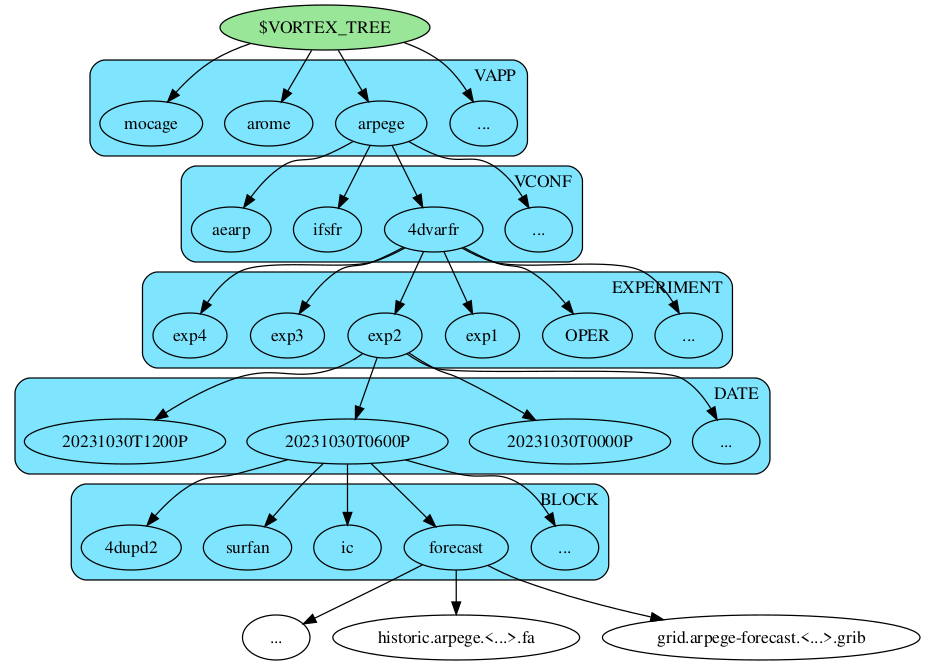
tree made of 5 distinct levels:
Below is the graphical representation of a vortex data tree:
The root directory#
By default, the data tree root directory is located in the user’s home
directory as vortex.d.
The VAPP/VCONF levels#
The root directory is followed by two levels of directories, specified
by the arguments vapp and vconf. For example, a call to
vortex.input(
    # ...
    vapp="arpege",
    vconf="4dvarfr",
    # ...
)
will generate a ressource path beginning with
$HOME/.vortex.d/arpege/4dvarfr.
The name for the vapp and vconf directories is arbitrary, and
the vortex.input function will create non-existing directories
automatically.
The experiment identifier level#
Below the vconf level are directories named after the experiment
identifier. The experiment identifier is set by the value passed to
the argument experiment of functions such as vortex.input or
vortex.output. The following call to output instanciates a
ressource to be written under arpege/4dvarfr/my-experiment.
vortex.output(
    # ...
    vapp="arpege",
    vconf="4dvarfr",
    experiment="my-experiment",
    # ...
)
The date level#
An experiment subdirectory for a given experiment identifier typically
contains multiple date directories named following the convention
YYYYMMDDTHHMMC. The final C stands for the cutoff character which
can be either 'A' for assimilation runs or 'P' for production
runs.
The following call to output instanciates a ressource to be written
under arpege/4dvarfr/my-experiment/20240826T0000P.
vortex.output(
    # ...
    vapp="arpege",
    vconf="4dvarfr",
    experiment="my-experiment",
    date="20240826T0000",
    cutoff="production",
    # ...
)
The date specified as a value to the date argument refers to the
date the forecast initial condition is valid for, not to the
validity date of a particular file. For instance, data files
corresponding to term +51h of a forecast for which the initial
condition is valid on the 2024-11-04 at 06:00UTC will be found under
the 20241104T0600P or 20241104T0600A directories, not under the
20241106T0900P or 20241106T0900A directories.
The block level#
Within a date directory, data files are grouped into subdirectory referred to as blocks. Similarly to vapp, vconf and experiment directories, the name of blocks is arbitrary. Missing block directory will be created if they do not already exist.
Note
Block are typically used to group data files that are related to each other. For instance, blocks for a 4DVAR ARPEGE forecast include but are not limited to:
observationsFiles related to the processing of observations.
4dupd2Intermediate and final analysed states, configuration files.
forecastModel states and GRIB format exports written as part of the forecast step.
aeroGRIB files resulting from post-processing operations related to aeronautics.
The file level#
Finally, block directories contain the data files themselves
.vortex.d/arpege/4dvarfr/20241104T0600P/4dup2/
    analysis.atm-arpege.tl1798-c22.fa
    anamin.arpege.tl224.fa
    anamin.arpege.tl499.fa
    listing.arpege-oops.a0001-b0001
    listing.arpege-oops.oops
    odb-ccma.traj.mix.tgz
    varbc.arpege-traj.txt
The files names are computed according to rules defined by the
underlying Ressource objects instanciated by calls to functions like
vortex.input or vortex.output.